
September 30, 2026
Turn your ChatGPT work into a portfolio: profiles hold up to 12 Sites
A public profile brings your Sites and plugins together under one shareable link.

OpenAI Developers
@openaidevs
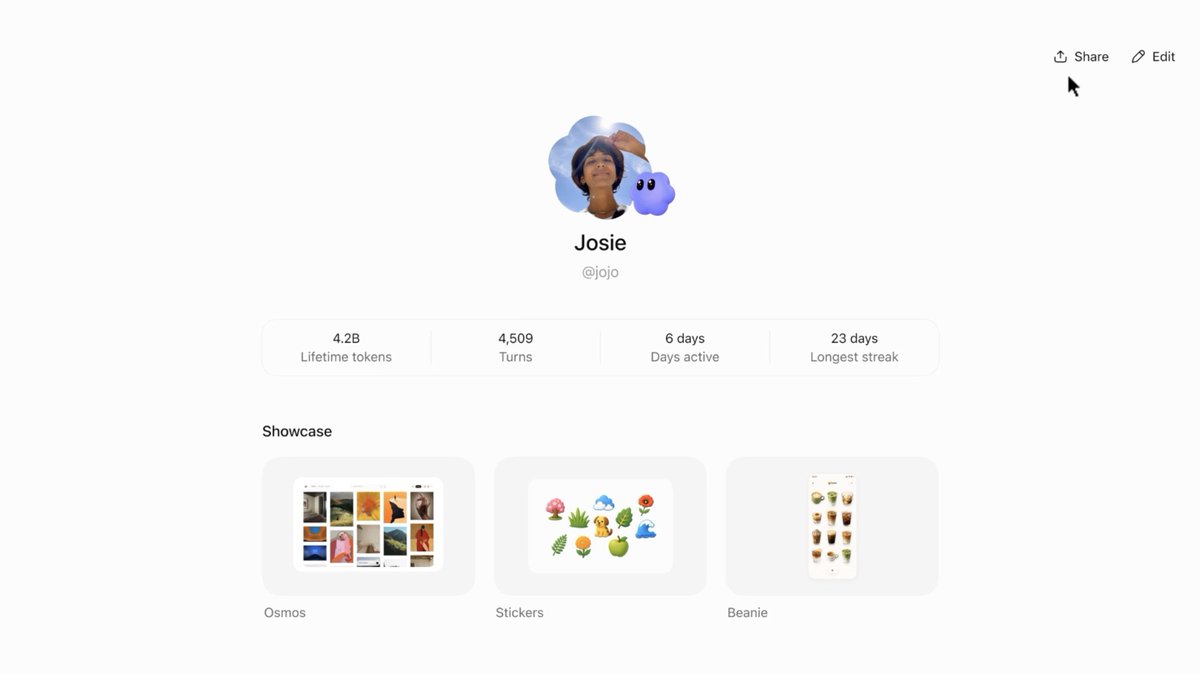
Public profiles bring your Sites and plugins together in ChatGPT so others can discover and use what you've created. Made something? Show everyone.
· 28.2K views

On Sep 29, OpenAI added profile publishing to ChatGPT. A single profile can showcase up to 12 of your own Sites.
The profile serves as a showcase for your work within ChatGPT. Visitors can discover your Sites and plugins and use them themselves.
Publishing your profile. Profiles are private by default. Open your profile, set your name, username, and description, then click Share in the top right and choose public access.
Adding your work. Add Sites from your profile or through each Site's sharing settings. Each Site must be public and belong to the same workspace, and adding it to the showcase does not change its access settings.
Visitors must sign in to ChatGPT to view a profile. Changing your username disables the old link.
Profiles are available on web and desktop in all countries. The Sites showcase is not yet available on mobile, and in Business, an administrator controls profile visibility through Workspace settings > Permissions & roles > Member profiles.
OpenAI says Enterprise support will be added later.
